3.5. Брошенная корзина
Содержание:
Что такое брошенная корзина
Брошенная корзина — это корзина в Интернет-магазине или Мобильном приложении, в которую клиент добавил товары или услуги, но не завершил оформление заказа. Корзина считается брошенной, если с момента последних действий с корзиной прошло определенное время (по умолчанию в тестовом режиме – это 1 час). Информация о брошенной корзине на время тестового режима хранится очень долго. Далее срок хранения информации обсуждается с Партнёром.
Как это работает
На сайте установлен JS-трекер. На каждое действие клиента, связанное с корзиной (добавление продукта, удаление продукта, изменение количества продуктов, оформление заказа) сайт вызывает метод JS-трекера. Трекер передает информацию в Loymax Smart Communications. Если Система идентифицировала посетителя сайта как клиента, информация о корзине привязывается к карточке клиента в Smart Communications.
Брошенная корзина отображается в Профиле клиента до тех пор, пока он не оформит заказ, либо пока не истечет время жизни корзины.
По брошенной корзине хранится информация:
- Дата и время последнего обращения к корзине;
- Состав корзины.
Можно создать кампанию для брошенной корзины (триггер — Брошенная корзина). Корзина считается брошенной по истечении установленного времени, после чего сработает триггер.
В коммуникации можно использовать время создания корзины и состав корзины.
Поиск клиентов с брошенными корзинами в Построителе сегментов
Построитель сегментов позволяет найти всех клиентов, у которых есть или нет брошенная корзина. Для этого используется специальное условие — Есть брошенная корзина.
|

Уведомление клиентов о брошенной корзине
Клиентам можно отправить сообщение о брошенной корзине в рамках кампании или массовой рассылки. Шаблонизатор сообщений Smart Communications позволяет использовать в сообщениях специальные метапеременные, отображающие в рассылке содержимое корзины. Пример вывода содержимого корзины можно посмотреть здесь.
Инструкция по настройке кампании для брошенной корзины
Настраиваемая кампания для брошенной корзины автоматически отправляет сообщение клиентам, которые добавили продукты в корзину, но не завершили оформление заказа.
Чтобы настроить кампанию для брошенной корзины:
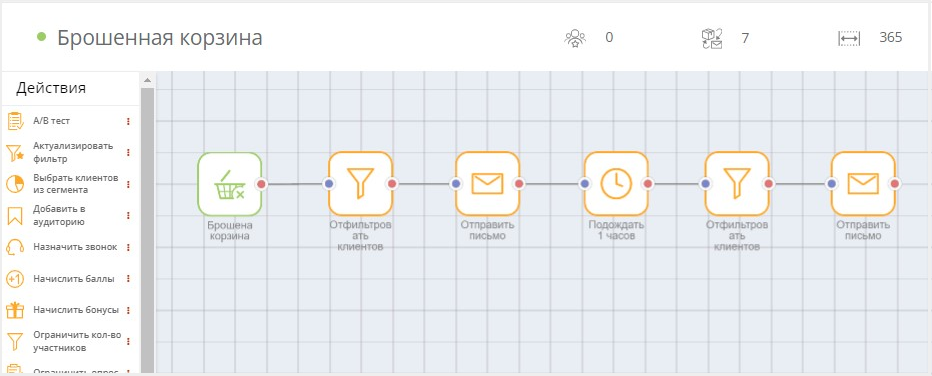
- Создайте кампанию с триггером Брошенная корзина.
- Добавьте действие Отфильтровать клиентов, где выбираются клиенты с согласием на коммуникацию. Например, для email-рассылки — это связка фильтров: валидный email и активная email-подписка.
- Добавьте действие Отправить письмо. В сообщении используйте метапеременную для отображения содержимого брошенной корзины.
- После отправки письма можно добавить действие Подождать.
- Добавьте действие Отфильтровать клиентов, где нужно применить фильтр Есть брошенная корзина = Да. Это необходимо, чтобы отправить сообщение только тем клиентам, которые ещё не завершили оформление заказа (они могли это сделать за время ожидания).
- Добавьте действие Отправить письмо, где можно напомнить о незавершенном заказе и, например, предложить купон на скидку.
Пример кампании для брошенной корзины:
|